RAG chatbot: Querying documents effectively
March 08, 2026
This week, I will demonstrate the basics of building a personal assistant with a focus on retrieval-augmented generation (RAG) to support long-term context without token limits. We will be using the chatbot we developed in the last post, as well as the GPT-2 and GPT-4.1 nano models. This post will be shorter than usual since the implementation of RAG with the previously built chatbot is relatively straightforward.
Retrieval-augmented generation (RAG) is an architecture used for language models that combines retrieving information with text generation. As such, RAG is meant to influence the text generated from a languange model. Essentially, one creates a bank filled with information. The information relevant to the query initiated by the user is retrieved from the bank and is then used to create a context prompt. The prompt is passed into the text generating model with clear instructions to base the output on the retrieved information. This architecture allows for outputs grounded in previously obtained knowledge as opposed to relying on what the model learned during its training phase.
Langue models are not easy nor cheap to consistantly train as more information is obtained (see post). As such, they do not have access to recent data. When prompted, they can output outdated or even worse, completely wrong answers brought about by hallucinations. With RAG, you have a corpus of information you can periodically update and have the assistant chatbot retrieve the information to use as context for the text generation step without having to change the model’s weights. Additionally, RAG is a way for private companies to store information that is only meant to be accessible by employees. These internal documents can then be queried without including the information into the training set of a model. Overall, RAG provides a way to continuously update knowledge without having to retrain the model.
The first step is to define our parameters in a .yaml file and use SimpleNamespace to store them. In this case, the parameters are the following:
{
  "model_name": "gpt2",
  "api_model_name": "gpt-4.1-nano",

  "seed": 42,
  "n_turns": 6,

  "docs_dir": "../data/raw/",
  "log_dir": "../outputs/logs/",
  "state_dir": "../outputs/state/"
}
The only new parameter compared to last post is docs_dir. As one would imagine, this is where the documents we will use for our RAG assistant are stored.
The chatbot code and Gradio wrapper are basically the same as the previous post. The only changes are two lines that I have now included in the class constructor:
DOCUMENTS = iter_jsonl_directory(docs_dir)
self.retriever = DocsRetriever(DOCUMENTS)
The first line is used to grab all the .jsonl files in the directory (I’m only including one for proof-of-concept), pass the text through a processing step, append to a list, and output it. The second line initializes the documents retriever and prepares for query. Let’s dive deeper (docstrings are suppressed for brevity. See the file documents.py for more information):
def iter_jsonl_directory(directory: str) -> list[str]:
    directory = Path(directory)

    all_text = []
    for file_path in directory.glob("*.jsonl"):
        all_text.append(process_documents(file_path))

    return [text for subtext in all_text for text in subtext]

def process_documents(path: str) -> list[str]:
    DOCUMENTS = []
    for doc in iter_jsonl(path):
        DOCUMENTS.extend(chunk_text(doc["text"]))
    return DOCUMENTS

def chunk_text(text: str, chunk_size: int = 80) -> list[str]:
    return [text[i:i+chunk_size] for i in range(0, len(text), chunk_size)]
Since I’ve already described the primary purpose of the first function, let’s just into the next two functions, which is the processing step. For this example, the processing only entails breaking the text apart, known as chunking. For our purposes, we are breaking up the text at every $80$ characters.
What is the purpose of breaking the text up? Context windows have finite length. If you pass text longer than your context window, the text will get truncated. We want to avoid that since that would mean losing information crucial for the model output. Another issue could be giving too much context that the model ends up loosing the point of the query. You can image having a manager tasking you with priorities, but if he ends up dragging on for 30 minutes, it’ll be difficult to figure out exactly what he wants since you can become over-saturated with information. The same thing can happen with these models. To avoid any issues, we break the text up into managable pieces that we can insert into the context window.
When chunking the text, we also have to be conscious of what length to break the text up. I’ve already talked about what happens if the text is too long, but what if it’s not long enough? Going back to the manager example, if you manager gives you a one sentence priority list, this may not be a good thing because you may not have the context of the problem. Without context, you may solve the problem a way that is not valuable to the customer. The same thing occurs with these models. If your text is too short, the model will not have enough context to properly produce an output.
The next step is passing the text into the documents retriever. The code for this is (docstrings are suppressed for brevity. See the file retriever.py for more information):
class DocsRetriever:
    def __init__(
        self,
        documents: list[str],
        model: str = "all-MiniLM-L6-v2"
    ):
        self.documents = documents
        self.model = SentenceTransformer(model)

        embeddings = self.model.encode(documents, convert_to_numpy=True)
        self.index = faiss.IndexFlatL2(embeddings.shape[1])
        self.index.add(embeddings)

    def retrieve(
        self,
        query: str,
        k: int = 1
    ) -> list[str]:
        query_emb = self.model.encode([query], convert_to_numpy=True)
        _, idcs = self.index.search(query_emb, k)
        return [self.documents[i] for i in idcs[0]]
This class is designed with the purpose of mapping text to vectors and to retrieve the documents that lie close to the query. In the constructor, we load a sentence-transformer model provided by Hugging Face called all-MiniLM-L6-v2. This model is nice to use because it’s embedding size is on the smaller end making it fast, but more complicated systems may need a bigger model. You can read more about it here. Now, we use this model calculate the embeddings, which is the portion that converts text to a dense vector, and returns them as a numpy array. Next, we create an index that we can use to organize the documents. For our example, we are using the FAISS (Facebook AI Similarity Search) library [1]. This library finds the nearest neighbors to a query vector efficiently. Since this is for proof-of-concept, we use a Euclidean distance, brute-force search. More efficient searches can be implemented, but IndexFlatL2 is enough for our example. More information can be found here. Finally, the embeddings are assigned an index.
When we go to retrieve, we pass in the query, created embeddings for the query using encode, and perform a search over all documents to find the one that lies closest to the query. As a note, we have set $k = 1$, which means that the search will return the highest matching document. Other options can be setting $k > 1$ to return other documents that may also lie close, and using other algorithms to determine the best output. That is all it takes to retrieve documents for a query.
The last step is to inject the documents queried into the prompt. For this, we write functions that put together the prompt similar to the chatbot. The only difference is that now we purposely indicate to the model which information it should use to generate output text. I won’t copy over all the functions since they are mostly identical to what I showed in the previous post. I will only show the difference:
return (
    f"System prompt: {SYSTEM_PROMPT}\n\n"
    f"Use ONLY the information below to answer.\n"
    f"Context:\n{context}\n\n"
    f"{history_text}\n"
    f"User: {user_message}\n"
    f"Assistant:"
)
We can see that when we inject the retrieved information into the prompt, we literally just add it into the prompt! We also specify to the model to answer the question using only the context obtained form the documents query. This step serves to constrain the text generation to only the context provided. Now, the model will know that it needs to use the specific information gathered from the documents to answer the user’s query. Note that we also keep the history (memory state) as before, since a second query may depend on the first.
All the code I’ve shown is incorporated into the chatbot from last post in the constructor and in the chat method, where the function call to the retriever happens and is shown below:
def chat(self, question: str) -> str:
    docs = self.retriever.retrieve(question)

    prompt = build_prompt_with_history(
        self.memory.last_n_turns(self.n_turns),
        docs,
        question
    )

    text = self.lm.generate_text(prompt)
    reply = extract_assistant_reply(text)

    self.memory.add_user(question)
    self.memory.add_assistant(reply)
    return reply
That is essentially all that changes (besides some parameter passing). Like before, the chat logs and conversation states are also saved, but I won’t include them since we covered that in the last post. Before we move on, we should see what the document we will be using looks like:
{
    "id":"doc_001",
    "text":"Quantum entanglement describes correlations between particles that cannot be explained classically.",
    "topic":"physics"
}
{
    "id":"doc_002",
    "text":"The Higgs boson explains how particles acquire mass through interaction with the Higgs field.",
    "topic":"physics"
}
{
    "id":"doc_003",
    "text":"Transformers rely on self-attention mechanisms to model token relationships.",
    "topic":"ml"
}
Each piece of information contains an ID and a topic. The ID is used so that you know which piece of information will be used in that specific query can be identified and logged. The topic can be used for more in-depth and topic-specific queries where one grabs all the information related to a topic. The text is the information that will be queried.
Now that we’ve gone over all the important pieces, let’s run the code and see how well it works. Although initial testing was done with the GPT-2 model, I will only show the GPT-4.1 nano model output since we know it outperforms the GPT-2 model. As before, we will build the user interface (UI) with Gradio [2].
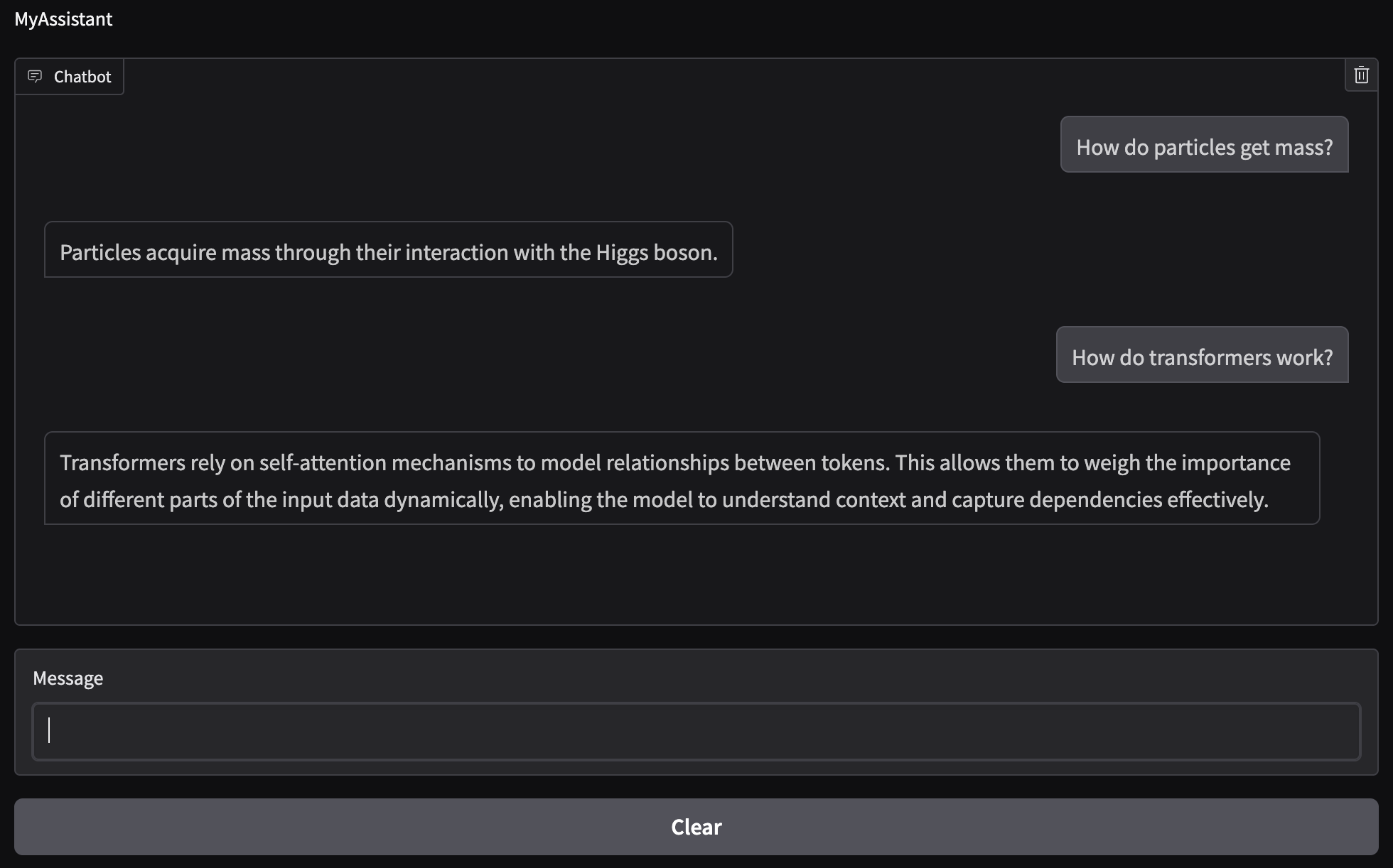
From the figure we can see that the questions I inputted are in fact being answered using the information from the document. Of course, the model then adds a bit more information since I have the max output tokens set to $100$, but we can see that the first sentence is just a slight rewording of the information we provided.
We have now created a RAG-based chatbot that uses internal documents to answer user queries. We went over how the query is performed and demonstrated a simple way of processing the information. We also discussed where and how the information gets included to ensure that the model uses it when generating an output. Finally, we showed a basic example as to how the documents can organized. In demonstrating the model output, we saw that our RAG model did in fact used the information obtained from the document to answer our questions.
The RAG process can be scaled by using a different search function since FAISS is CPU-based and IndexFlatL2 is a brute-force nearest-neighbor search. Additionally, the query and embeddings creation is synchronous, which means that it is performed at every user query. An efficient RAG model would pre-compute the embeddings and store them for retrieval. We can also have more complicated documents such as PDFs that we can scrape and store. Ideally, a database can be pre-built to avoid unnecessary computations that account for latency in the output. Another step can be added to the query that involves metadata filtering, such as keyword search, which can greatly improve the fidelity of the output, especially as more information is added to the library the model pulls from.
Note that while RAG is definitely a powerful tool, it is not fool-proof. The text generation from the model is probabilistic and the context obtained from the documents may not be enough to answer a question successfully. The information needed may not be contained in the documents retrieved or perhaps it is ambiguous and the model cannot successfully reason through it. Care must be taken when analyzing outputs to ensure that the model did not hallucinate and produce a wrong solution.
The code presented in this post can be found on my Github under the rag-chatbot repo [3]. Feel free to reach out if you have any questions about what we covered this week. Next time we’ll discuss parameter-efficient fine-tuning using low-rank adaptation (LoRA). Stay tuned!
- [1] Matthijs Douze al., The Faiss library, 2024.
- [2] Abubakar Abid, Ali Abdalla, Ali Abid, et al., Gradio: Hassle-Free Sharing and Testing of ML Models in the Wild, arXiv preprint arXiv:1906.02569, 2019.
- [3] Alberto J. Garcia, Conversational Chatbot with Retrieval-Augmented Generation (RAG), 2026. Available at: https://github.com/AJG91/rag-chatbot.